![Insights_horiz-1.png]](https://support.elumenconnect.com/hs-fs/hubfs/Insights_horiz-1.png?height=40&name=Insights_horiz-1.png)
Course Review Cycles
Course Review Cycles define when a course review begins, how long it remains active, and which reflection template is used during that period. Before a Course Coordinator can conduct a course review, an Assessment Coordinator (AC) or Program Coordinator (PC) must first configure a Course Review Cycle for the course.
Who Can Configure Course Review Cycles
-
Assessment Coordinators can configure review cycles for all courses.
-
Program Coordinators can configure review cycles only for courses within the departments they manage.
Access the Course Review Cycles Tool

To manage Course Review Cycles:
-
Navigate to the Course Central page.
-
Select Manage Course Review Cycles.
This opens the Course Review Cycles management interface.
Create a Course Review Cycle
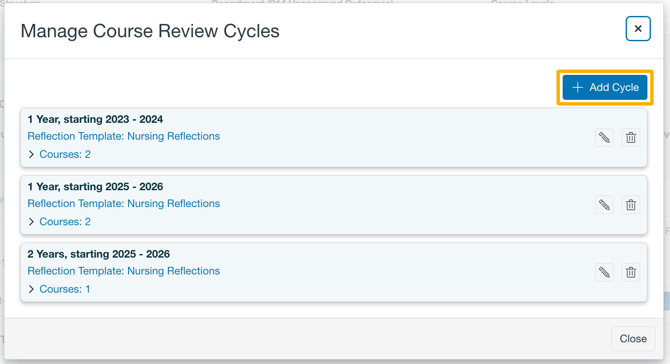
Once in the interface, click the + Add Cycle button.
When creating a Course Review Cycle, coordinators must configure the following:
Add Cycle Settings
When creating a Course Review Cycle, coordinators must configure the following:
Cycle Duration
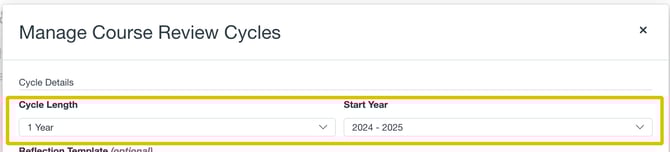
- Cycle Length– Defines the number of years the cycle will be set to.
-
Start Year – The year the review cycle begins.
NOTE: The duration also determines when the next review cycle would implicitly begin.
Reflection Template (Optional)

-
Coordinators may associate a Reflection Template with the review cycle.
-
This template will be used for faculty reflections during course reviews conducted within the cycle.
Course Assignment
-
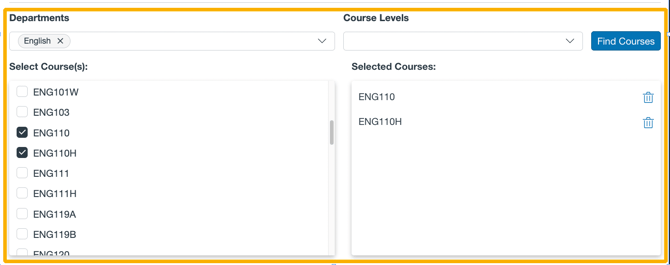
Assign the review cycle to one or more courses.
-
The course selection filter functions the same way as the filter used for course group configuration.
Note:
Program Coordinators will only see and be able to select courses within their assigned departments.
Review Cycle Visibility
Once a course has an associated review cycle:
-
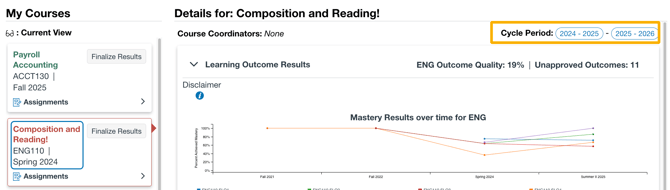
The Review Cycle will appear on the course outcomes on the Course Central page.
-
The Review Cycle will also appear on the Course Details on the Faculty Dashboard.
Course Coordinator Access
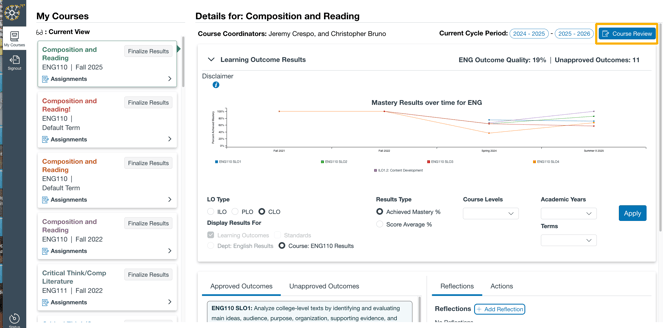
A Course Coordinator:
-
Cannot conduct a course review until the course has an active review cycle.
-
A review cycle is considered active when its start year is in the past.
When an active review cycle exists:
-
The Course Review button appears for Course Coordinators assigned to the course.
-
Other users will see the review cycle period displayed, but will not see review controls.
Key Notes and Limitations
-
Course Review Cycles must be configured before Course Coordinators can begin reviews.
-
Review cycles control both timing and reflection structure for course reviews.
-
Visibility and permissions vary based on the user’s role.
- Review cycles automatically renew at the end of the cycle.