![Insights_horiz-1.png]](https://support.elumenconnect.com/hs-fs/hubfs/Insights_horiz-1.png?height=40&name=Insights_horiz-1.png)
Assigning the Course Coordinator Role:
The Course Coordinator role can be assigned by either an Assessment Coordinator or a Program Coordinator.
What changed?
Previously, only Assessment Coordinators could access the Users page in Setup. Access has been expanded to include Program Coordinators.
Both roles can now view the Users page; however, available actions and permissions differ based on the user’s assigned role, as shown below.
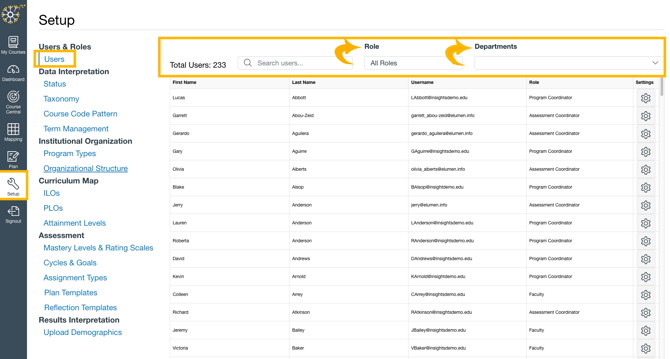
To access the Users page and assign the Course Coordinator role as an Assessment Coordinator, follow the steps below.
Step 1: Open the Users Page
-
Select Setup from the left-hand navigation.
-
From the Setup menu, select Users.
Step 2: Locate the User
On the Users page, you can:
-
Search by First Name or Last Name
-
Filter by Roles (Assessment Coordinator, Program Coordinator, Course Coordinator, Faculty)
-
Filter by Departments to view users assigned to specific departments
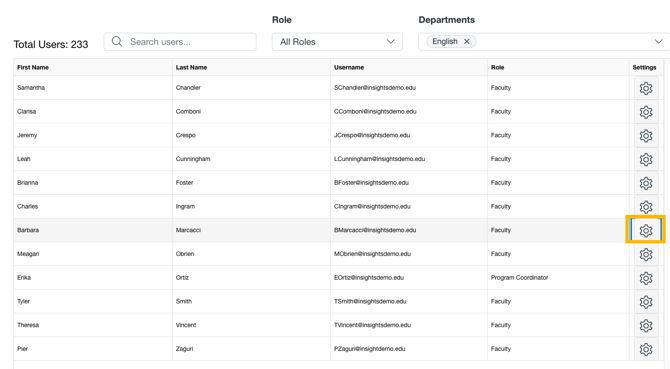
Once you locate the user, select the gear icon to the right of their name.
Step 3: Assign the Course Coordinator Role

-
In the dialog box, select Course Coordinator from the Role dropdown.
-
Use the Coordinated Courses dropdown to assign one or more courses.
-
You can filter the list by typing the course code.
-
-
Select Save.
Step 4: Confirm the Assignment

-
The user’s role will now display as Course Coordinator.
-
To view or update the courses assigned to that user, select the gear icon again.
In the Faculty role, course coordinators must be assigned as an instructor in any course they will be coordinating.
Additional Notes
-
Course Coordinator role and courses within that role can be assigned by users with the Program Coordinator or Assessment Coordinator roles.
-
Users may be assigned to multiple courses.
- Assessment Coordinators can assign Program Coordinators can be assigned to coordinate courses without changing their role.
Program Coordinator User Management Permissions
Program Coordinators have access to user management tools with limited permissions. They can manage users who have the Faculty or Course Coordinator role only within the department or departments to which they are assigned.
Example
A Program Coordinator assigned to the English Department can:
-
Change a user’s role from Faculty to Course Coordinator, only if the user is assigned to the English Department
-
Change a user’s role from Course Coordinator to Faculty, only if the user is assigned to the English Department
-
Assign courses to the Course Coordinator role, only if the courses belong to the English Department (This applies to all Coordinator roles with courses in the English Department).
Program Coordinators cannot manage users or courses outside of their assigned departments.